
Free · Runs in your browser

Free audio normalizer for podcast and YouTube loudness

This audio normalizer measures integrated LUFS and true peak, sets the target you pick — −16 for podcasts, −14 for YouTube — and exports a WAV. It runs in your browser, so nothing is uploaded.

Drop an audio file to measure it

or browse files · MP3, WAV, M4A, FLAC · up to 20 min · stays on your device

  • Nothing uploaded
  • Free, no sign-up
  • True peak capped at −1 dBTP

Hear it · no file needed

A / B
0:00 / 0:00
Original

Hear the difference

Clean the audio first, then normalize it

An audio normalizer changes volume, not noise — turn up a noisy file and the noise comes up too. These samples show cleanup; clean first, normalize audio after, and the result is clean and on target.

  • ABSwitch at the same moment — the word you were hearing, cleaned.
  • R“Hear what we removed” plays only the noise, so you know the voice is intact.
  • []Drag the strength. It mixes live in your browser — no re-processing.

Demo clips are short synthetic signals for illustration. Real before/after recordings are being added.

Spare-room podcast with the air conditioner running

0:00 / 0:00
Original

Tool: Loudness Normalizer

Loudness targets

Loudness normalization targets for each platform

Integrated loudness is the whole-file average an audio normalizer sets. True peak is the highest point once the audio is converted for playback.

Where it playsIntegratedTrue peakNotes
Apple Podcasts−16 LUFS ±1−1 dBTPApple’s published guideline for podcast episodes
Spotify−14 LUFS−1 dBTPSpotify’s default playback normalization level
YouTube≈ −14 LUFS—YouTube turns louder uploads down
Amazon Music / Alexa≈ −14 LUFS—Playback is normalized; check Amazon’s current spec
US broadcast (ATSC A/85)−24 LKFS−2 dBTPUS television; LKFS and LUFS are the same unit
EU broadcast (EBU R128)−23 LUFS−1 dBTPEuropean TV and radio

Targets change from time to time — check each platform’s current documentation before delivery. These are widely published guidelines, not a promise of how any platform will play your file.

Honest limits

What an audio normalizer can — and can’t — do

An audio normalizer sets the loudness of the whole file — and that’s all it does.

Works great

  • Setting a file to −16 or −14 LUFS
  • Keeping true peaks under −1 or −2 dBTP
  • Matching loudness across episodes or videos
  • Measuring integrated LUFS and true peak before you publish

Improves a lot

  • Very quiet recordings — though noise rises with them
  • Files mastered far too loud
  • Episodes with a few sharp laughs or peaks
  • One master headed to several platforms

Can’t fully fix

  • Remove noise, hum or echo
  • Even out a loud host and a quiet guest
  • Ride the volume section by section, like an audio leveler
  • Fix distortion already in the file
  • Change the sound of the voice

How it works

How to normalize audio in three steps

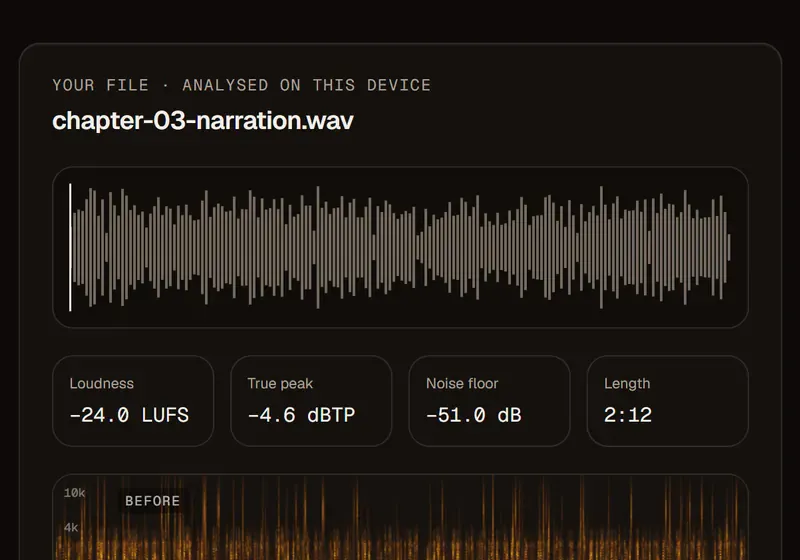
  1. Audiobook chapter measured in the audio normalizer: −24.0 LUFS, −4.6 dBTP true peak and its waveform

    Fig. 01

    Drop an audio file

    MP3, WAV, M4A or FLAC. It opens right in your browser and is never uploaded.

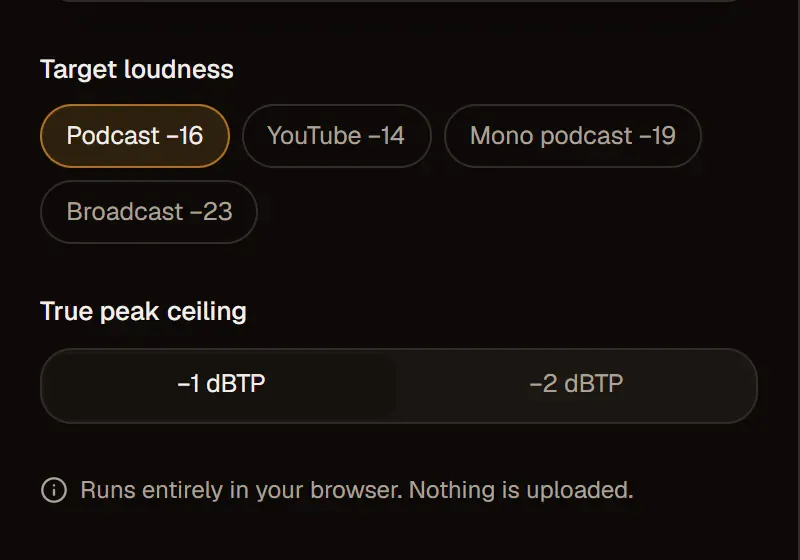
  2. Target loudness chips with Podcast −16 selected, YouTube −14, Mono podcast −19, Broadcast −23 and a −1 dBTP ceiling

    Fig. 02

    Pick a target in the normalizer

    See integrated LUFS and true peak, then choose Podcast −16, YouTube −14, Mono podcast −19 or Broadcast −23.

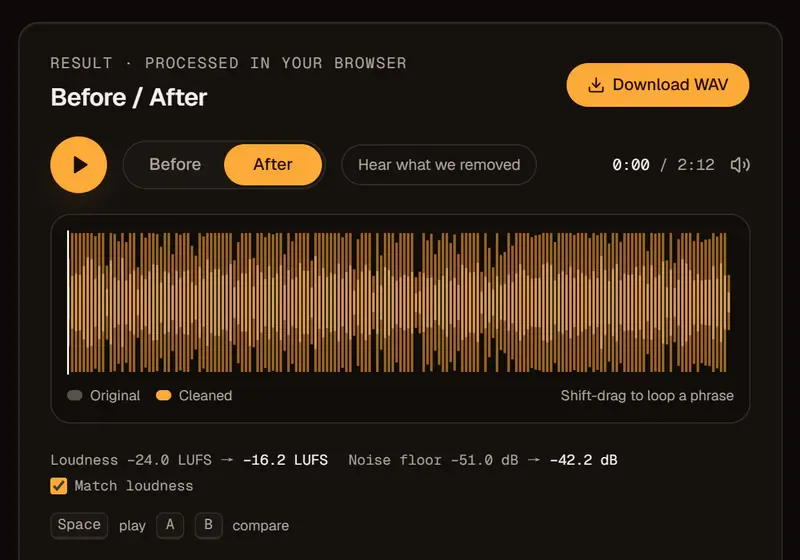
  3. Normalized audio Before/After in the browser, from −24.0 to −16.2 LUFS, with a Download WAV button

    Fig. 03

    Export normalized audio as WAV

    Download a WAV at your target with a true-peak ceiling of −1 or −2 dBTP.

Controls that matter

A free audio normalizer that’s private and exact

An audio normalizer that never uploads

Measurement and normalization run entirely in your browser. Your audio file is never uploaded, so it stays private.

LUFS normalization, not peak guessing

Loudness is measured with the ITU-R BS.1770 method that defines LUFS — not by the loudest sample. One gain change and a true-peak limiter then set the level.

A true-peak ceiling for your audio

True peak at −1 dBTP for podcasts and streaming, or −2 dBTP for extra headroom.

Free audio normalizer, no account

No minutes used and no sign-up. Use the audio normalizer online as often as you like, on files up to 20 minutes long.

Lossless WAV audio out

Exports are WAV, so your podcast host or editor does the final encoding just once.

Guide

Peak vs LUFS normalization — why “−1 dB” files still sound different

Why an audio normalizer should measure LUFS, not peaks

Peak normalization matches the loudest moment; LUFS normalization matches how loud a file sounds — and only LUFS makes two files play at the same volume.

Two recordings can both peak at −1 dB while one sounds much louder, because one is mostly quiet speech and the other is dense and compressed. LUFS measures average perceived loudness over the whole file — the kind of measurement streaming and podcast platforms use to set playback levels. A tool sold as an “audio volume normalizer” can mean either kind; this audio normalizer uses loudness normalization.

Peak normalizationLUFS normalization
MatchesThe loudest samplePerceived loudness
Two files sound equally loudRarelyYes
What platforms measureNoYes
Watch out forQuiet speech stays quietNeeds a true-peak limit

Audio normalizer vs audio leveler

An audio normalizer moves the whole file up or down by one amount; an audio leveler rides the volume moment to moment, lifting quiet passages and pulling loud ones down.

So a soft-spoken guest stays quieter than a loud host: this tool applies one gain change plus a true-peak limiter, with no compression. Speaker leveling is coming to the Podcast Enhancer. For now, record guests on separate tracks, set each one’s loudness before you mix, and normalize the finished mix last, after cleanup.

Does Spotify volume normalization make this unnecessary?

No — platforms adjust playback volume themselves, but delivering near their target keeps you in control of how your audio sounds.

Spotify volume normalization plays tracks at about −14 LUFS by default, and YouTube turns louder uploads down to a similar level. They only move the whole file, though: a master pushed far too loud gets turned down with its dynamics already flattened. Listeners can also switch Spotify’s normalization off, and not every player normalizes. Normalize audio to the target yourself, and what you hear in your editor is close to what your audience hears.

What about mono podcast audio?

Some producers aim for −19 LUFS on mono files, while Apple’s published guideline is −16 LUFS either way.

The idea is that a mono voice played through two speakers can sound louder than a stereo file at the same level. The normalizer offers both, so export each and compare on earbuds.


Pricing

The audio normalizer is free — cleanup is paid by the minute

Normalizing runs on your device and uses no minutes. AI cleanup runs on our servers, billed per file and rounded up to whole minutes; failed jobs return their minutes.

See full pricing

Free

$0

30-second previews with no sign-up, plus 10 free minutes when you create an account.

Pay as you go

$4.992 hours

≈ $2.50 an hour. WAV and video exports. Minutes last 12 months.

Creator

$9.99/ month

10 hours every month for weekly shows and channels.

A private audio normalizer: your file stays in the browser

  • Nothing is uploadedLoudness is measured and adjusted on your device. Your file never leaves your browser.
  • Nothing to deleteNo copy is kept anywhere. Close the tab and it’s gone.
  • Your content stays yoursNo watermark, no ads, no sign-up needed for the normalizer.

FAQ

Audio normalizer questions, answered

Something else? Write to support@audio2clean.org.

−16 LUFS integrated, with true peak no higher than −1 dBTP. That’s Apple Podcasts’ published guideline, with a tolerance of ±1 dB, and it’s the audio normalizer’s default. Upload the WAV — or your own MP3 encode of it — to your podcast host.

No. A normalizer moves the whole file to one target loudness; an audio leveler or compressor narrows the gap between quiet and loud moments. This tool only normalizes.

No. Normalizing only changes volume, so raising a quiet, noisy file raises the noise too. Remove the background noise first, then normalize the clean file. The Noise Remover also has loudness presets built in, so you can do both in one pass.

Yes. The audio normalizer runs entirely in your browser: your file is read, measured and processed on your own device and never sent to our servers. Our AI cleanup tools do upload files, and delete them after 24 hours.

Yes, for input: drop an MP3, WAV, M4A or FLAC and it’s normalized the same way. The download is always a WAV, so encode your MP3 from it last — the true-peak ceiling leaves headroom for that encode.

Not in the browser normalizer — it works on audio files only. For a video, use Remove Background Noise from Video with the YouTube −14 preset: you get the same MP4 back, cleaned and normalized.

Yes — files up to 20 minutes, since processing happens on your own device. For longer recordings, the Podcast Enhancer sets loudness as part of its cleanup on our servers — up to 30 minutes per file on paid plans — with the same −16 and −14 LUFS presets.

Normalize audio free, right in your browser

Drop an audio file into the audio normalizer to measure and set its loudness. Nothing is uploaded.

Drop your audio file here

or browse files · MP3, WAV, M4A, FLAC · up to 20 min · stays on your device

Or open Loudness Normalizer without a file