




Guide
How to remove music from a video — and why mute can’t
Why “mute” can’t remove background music from video
Muting works on time, not on the type of sound, so it silences the voice along with the music.
A finished video usually carries one mixed audio track, so to keep the speech the mix has to be split into voice and music first — that’s how AI can remove music from video across the whole clip.
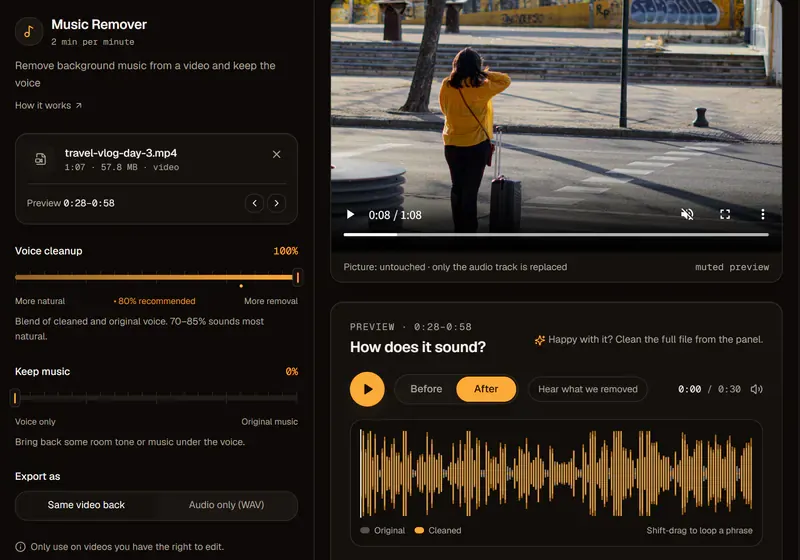
Some video editors now include voice isolation, and it’s worth a try if you already use one. The difference here is control over the music itself, with a fader to keep a little of it.
If the music is just too loud, turn it down instead
If you like the music but it competes with the voice, keep some of it rather than removing it.
A low soundtrack keeps the energy while every word stays clear. Adding new music in your editor? Use ducking — lowering the music whenever someone speaks.
| Goal | Keep music | Export |
|---|---|---|
| Replace the music | 0% | Video with voice only, or voice track WAV |
| Make it less distracting | 10–25% | The same video, remixed |
| Remix in your editor | 0% | Voice track WAV, then add new music |
Removing music doesn’t clear copyright
Removing music from your own video is fine; it doesn’t give you rights to someone else’s video.
Use it on videos you made or are licensed to edit — not to strip the music from someone else’s video and repost it. If a platform flagged your own video for a song, taking the song out doesn’t clear the claim by itself; follow the platform’s own process.