

Coming soon · Filler Word Remover for Creator and Pro

Remove filler words — and choose which ones go

Soon you’ll cut filler words like “um” and “uh” from podcasts and interviews with smooth crossfades, and decide whether “like” and “so” stay. It isn’t live yet; today you can preview noise cleanup on the same file free.

Drop a recording to preview cleanup

or browse files · MP3, WAV, M4A, FLAC, MP4, MOV · up to 2 GB

  • We never train AI on your files
  • Deleted after 24 hours
  • Free 30-second cleanup preview

Hear it · no file needed

A / B
0:00 / 0:00
Original

Hear the difference

Start with a clean recording, then cut the filler words

Filler word removal works best on clear speech. Hear what noise cleanup does to the kind of recording you’d cut filler words from, then try it on your own file.

  • ABSwitch at the same moment — the word you were hearing, cleaned.
  • R“Hear what we removed” plays only the noise, so you know the voice is intact.
  • []Drag the strength. It mixes live in your browser — no re-processing.

Demo clips are short synthetic signals for illustration. Real before/after recordings are being added.

Spare-room podcast with the air conditioner running

0:00 / 0:00
Original

Tool: Podcast Enhancer

You stay in control

Choose which filler words to cut

“Um” and “uh” are easy calls. “Like” and “so” sometimes carry meaning — the second “like” here is part of a sentence. Click any highlighted filler word to keep it — review will work this way at launch.

6 of 6 fillers will be cut · click a word to keep it

Hey everyone, welcome back to the show. Today we’re talking about how small teams plan their week. my guest runs a design studio in Denver, and she has a really simple system. before we start, I said last time, send us your questions.

Honest limits

What the Filler Word Remover will — and won’t — do

How it’s being built, so you know what to expect.

Works great

  • Clear “um” and “uh” between words
  • Filler words at the start of answers
  • Long interviews with a filler word in most sentences
  • Separate speaker tracks with clean audio

Improves a lot

  • “Like” and “so” — flagged for you to decide
  • A filler word right next to a breath
  • Fast talkers who run words together
  • Recordings with light background noise

Can’t fully fix

  • Rewrite a sentence that went wrong
  • Shorten a rambling answer — that’s editing
  • Cut filler words when two people talk at once
  • Remove filler words from video files at launch

How it works

How you’ll remove filler words once it launches

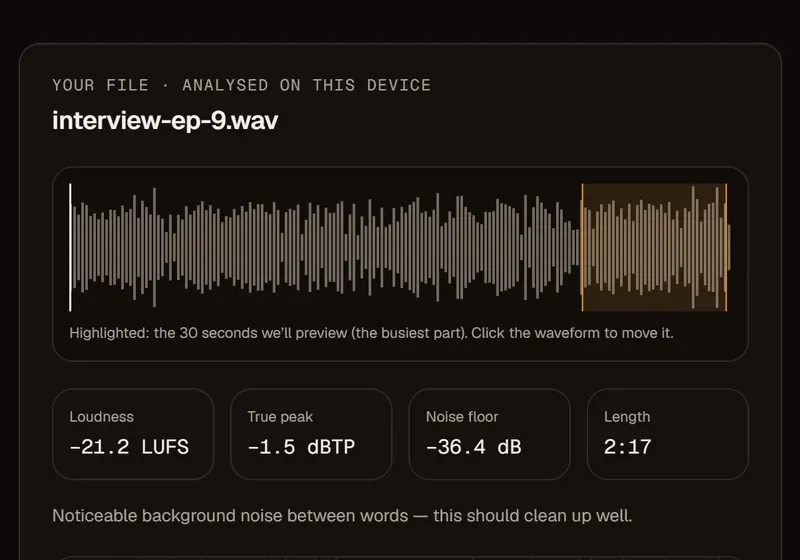
  1. Interview episode analysed on your device, with the preview window, loudness, true peak and noise floor

    Fig. 01

    Upload the recording

    An audio file of your episode or interview — ideally one track per speaker.

  2. Fig. 02

    Review the flagged filler words

    AI will transcribe the speech and mark every filler word. “Um” and “uh” start checked; “like” and “so” are your call.

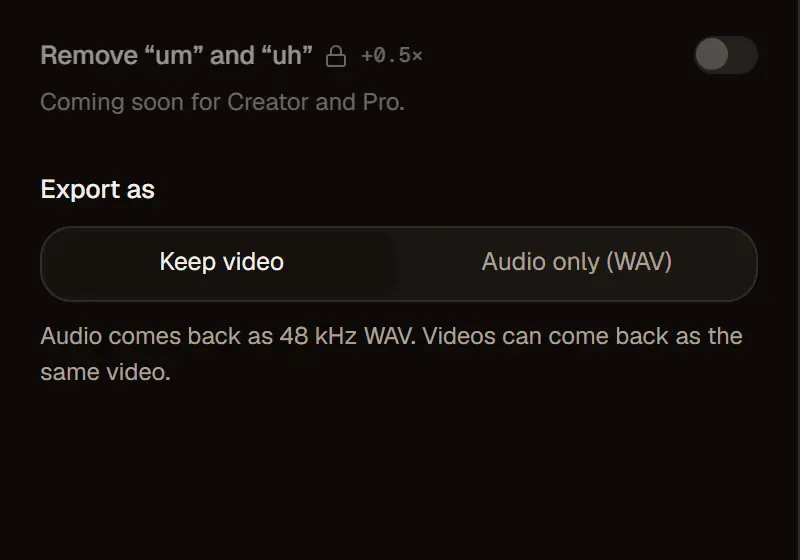
  3. Locked Remove “um” and “uh” toggle, coming soon for Creator and Pro, above the Export as options

    Fig. 03

    Export with smooth filler cuts

    Each cut is crossfaded so edits don’t click or jump. You’ll get a clean 48 kHz WAV back.

How it’s built

Filler word cuts you won’t hear

Word-level filler cuts

Speech will be transcribed with timing for every word, so each filler word is cut at its edges — not by guesswork on the waveform.

A crossfade at every filler

Every cut will get a short crossfade, so there’s no click, pop or jump in room tone.

You choose which filler words go

“Um” and “uh” will be flagged by default. “Like”, “so” and “you know” are yours to keep or cut.

Pairs with the Podcast Enhancer

Clean noise and set loudness to −16 LUFS today. Once it’s live, you’ll remove filler words in the same pass as an optional step.

Filler Word Remover: coming soon

Coming to Creator and Pro first. Until then, the live cleanup tools work on the same files.

Guide

Filler words: which to cut — and which to keep

What are filler words, and why do we say them?

Filler words are the small sounds and phrases people say while they think: “um”, “uh”, “like”, “so” and “you know”.

A filler word buys time to find the next thought or signals that you haven’t finished talking. A few are normal; they become a problem when they cluster and pull attention from what’s being said.

Which filler words to cut: “um” and “uh” first

“Um” and “uh” almost never carry meaning, so they’re safe to cut; “like”, “so” and “you know” often do.

“She was, like, really fast” and “it looks like rain” both contain “like”, but only one is a filler. That’s why these words will be flagged for you instead of cut automatically.

Filler wordDefaultWhy
um, uhCutPure hesitation
likeYour callOften part of the sentence
soYour callCan open a real point
you knowYour callSometimes a genuine question

How to remove filler words from speech at the source

The easiest filler word to remove is the one you never say.

Pause instead of filling the gap — a short silence sounds more confident than “um”. Speak from an outline, not a script, slow down slightly and record shorter takes. Knowing your own most common filler words makes them easier to catch.

How to remove filler words by hand in an editor

Until the automatic tool arrives, you can remove filler words by hand in any audio editor — it just takes time.

Mark each “um” and “uh”, select it from the end of the word before to the start of the word after, and delete it. Add a short crossfade at the cut and listen across the join; if the room tone jumps or the rhythm feels rushed, leave a little more space.

Don’t cut every single filler word

Leaving a few filler words in keeps a conversation sounding human.

A guest with zero hesitation can sound scripted. Removing the distracting ones — clusters, or a filler at the start of every answer — usually helps the flow more than removing them all.

Breaths aren’t filler words — keep most of them

Breaths give speech its rhythm; removing all of them makes sentences run together.

If a few are loud and sharp, speak slightly across the microphone next time. In the edit, lowering a harsh breath sounds gentler than cutting it out.


Pricing

Pricing for clean audio now and filler removal soon

Noise cleanup works now, billed by audio length and rounded up per file. Previews are free. The option to remove filler words is coming soon to Creator and Pro.

See full pricing

Free

$0

30-second previews with no sign-up, plus 10 free minutes when you create an account.

Pay as you go

$4.992 hours

≈ $2.50 an hour. WAV and video exports. Minutes last 12 months.

Creator

$9.99/ month

10 hours every month for weekly shows and channels.

Your recordings stay private, filler words and all

  • Deleted after 24 hoursUploads and results are removed automatically. Delete them yourself any time.
  • We never train on your filesYour recordings are processed to give you a file back — nothing else.
  • Your content stays yoursNo watermark, no ads, no re-licensing. You keep every right to your audio.

FAQ

Questions about how to remove filler words

Something else? Write to support@audio2clean.org.

Yes — that’s what the upcoming Filler Word Remover will do: transcribe your recording, mark each filler word and cut the ones you choose, with a short crossfade at every edit. It isn’t available yet.

Not yet. It’s coming soon, to Creator and Pro accounts first; this page explains how it will work. The live tools, from the Noise Remover to the Podcast Enhancer, work today.

By hand, for now: cut each “um” and “uh” in an audio editor and crossfade every edit, as the guide above describes. To remove filler words from audio automatically, you’ll need the Filler Word Remover once it launches. Meanwhile, the Podcast Enhancer can clean noise and set −16 LUFS on that file today.

Not at launch — it will work on audio files. Cutting words out of a video changes its length and makes the picture jump, which is a job for a video editor. For video, you can still clean the sound and keep the same MP4 with Remove Background Noise from Video.

They shouldn’t: each cut will sit at the word’s edges, with a short crossfade at the join. Filler words mumbled into the next word are harder to cut cleanly, so listen to those before you export.

Yes. “Um” and “uh” will be flagged by default; “like”, “so” and “you know” are left for you to decide, because they often carry meaning. Try it in the transcript above: keep the second “like” and the sentence still reads naturally.

It’s coming to Creator ($9.99 a month for 10 hours) and Pro. In the Podcast Enhancer it will be an optional step that uses a little extra time per minute of audio, and the Studio will show the exact cost before you export.

No. Recordings follow the same rule as every file on audio2clean: used only to process your request, deleted automatically after 24 hours and never used by us to train AI models. Transcripts will exist only to find the filler words, under the same rule.

Clean the recording now, remove filler words soon

Drop a file to preview noise cleanup free. The Filler Word Remover is coming soon for Creator and Pro.

Drop your audio or video here

or browse files · MP3, WAV, M4A, FLAC, MP4, MOV · up to 2 GB

Or open Podcast Enhancer without a file